Issue
Users managing Digi devices in offline environments may encounter difficulties accessing firmware updates on the Digi Support Site due to recent changes in the firmware distribution method for select Digi Devices.
Environment
-
Digi IX, EX, TX (applicable to other Digi devices)
-
Offline or restricted internet access environments
Resolution
Digi firmware updates remain accessible for offline use. Firmware is now distributed through Digi Remote Manager.
Steps to Download Firmware:
-
Login to Digi Remote Manager. If you do not have a login yet, refer to the following page:
-
Access Firmware Files:
-
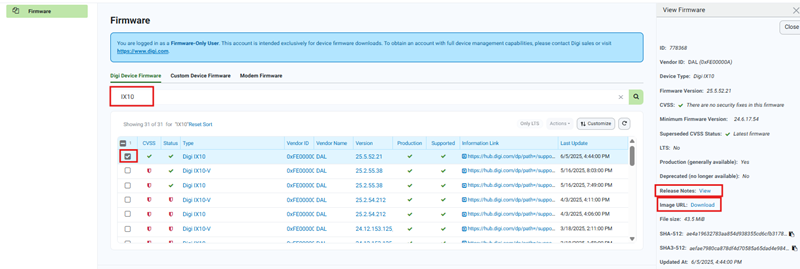
Once your account is active, log in to the Digi Remote Manager portal, and navigate to the Firmware page.
-
Use the filter to select your device model (e.g., IX10).
-
Choose the required firmware version.
-
Download the firmware image.
-
Review available release notes for the selected version.
Additional Information
-
This free firmware access account does not grant full Remote Manager functionality but provides full access to firmware downloads and release notes.
-
Offline firmware upgrades can still be performed as previously done.
Need Help?
If you encounter any issues or have additional questions, please contact Digi Support.
Last updated:
Oct 27, 2026